Exchange Server logs are a font of information but are sometimes hard to decipher. The format of the logs also make it difficult to easily bulk analyze the information. Exchange logs are typically in CSV format however they have comments at top of each file. Also, while they do have column header labels, these headers are contained within one of the comments rather than at the top like a standard CSV file. These two issues prevent directly using Import-Csv to analyze the data.
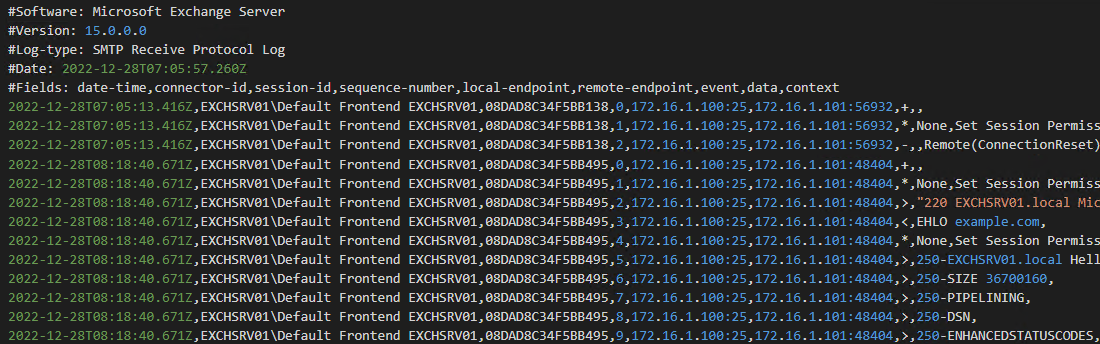
I recently needed to analyze some Exchange Server SMTP Receive logs, so I created a function to assist with importing and analyzing these Exchange log files. The goal of the function is to import the CSV data, ignoring the comment lines at the top, and dynamically use the field definition in the comments to set the headers for the import.
To use the function, just pass the path to the log file. It will remove the comments from the top of the file and attempt to use the field data defined in those comments to dynamically assign the column names.
PS C:\> $logs = Get-ExchangeLog "C:\Temp\RECV20221228-1.LOG"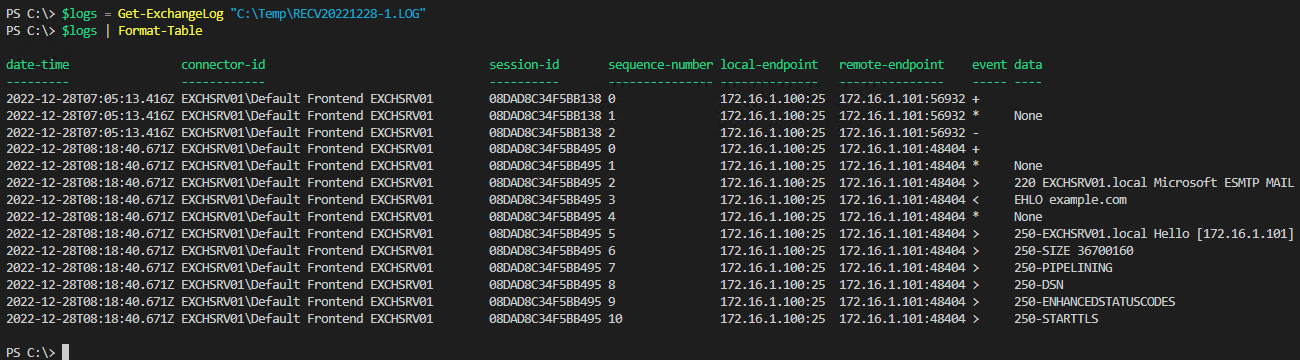
Now you have an object with proper headers that you can easily analyze. I hope this helps a little when having to work with Exchange Server logs. Let me know if you have any questions or comments.
Remember, a script a day keeps the work away!
~ian-mor
 Pwsh+
Pwsh+ 